Engine
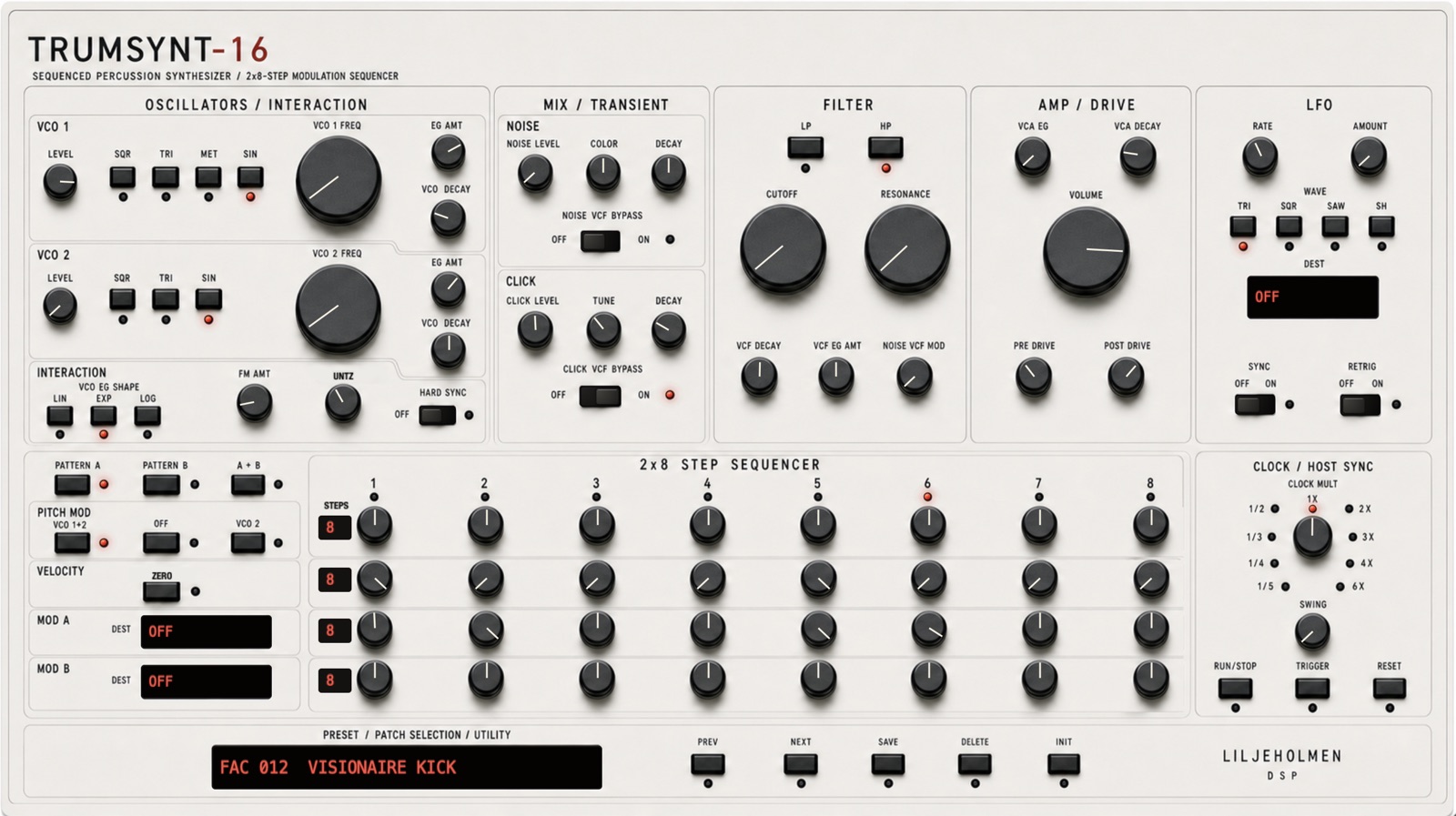
Two oscillators, noise and click layers feed a switchable low-pass / high-pass filter section, pre/post drive, and six independent decay envelopes.
A drum synth, percussion sequencer and sequenced percussion synth VST/AU plugin for sculpting and sequencing one voice at a time. Two oscillators, noise and click layers, filters, drive, six decay envelopes, and four per-step lanes. Run as many instances as the track needs.
Instrument
Two oscillators, noise and click layers feed a switchable low-pass / high-pass filter section, pre/post drive, and six independent decay envelopes.
Two 8-step pages can run alone or chained to 16. PITCH, VELOCITY, MOD A, and MOD B each have their own length, so the lanes drift against each other before the pattern comes back round.
VCO 1 adds METAL: six detuned squares at fixed non-harmonic ratios. Metallic percussion from the oscillator, not from a sample.
The oscillator path runs at 8x with FIR decimation, PolyBLEP square, and a band-limited triangle, so fast pitch sweeps stay clean.
MOD A, MOD B, and the LFO reach fixed destinations across pitch, filter, FM, decays, drive, pan, and UNTZ. No patchbay; the routing is part of the instrument.
Built to run one per drum. On a 2021 M1 Pro, one instance reads 6% in Ableton Live; twenty read 24%, and fifty read 50%.
Audio examples
Preset recordings with no external processing. Listen as MP3; download individual examples as WAV.
Completely dry
Completely dry
Completely dry
Walkthrough
Doug Woods of The Sound Test Room builds the sounds by hand and runs four instances of TRUMSYNT-16 together.
Plays on YouTube. Nothing is loaded from YouTube until you press play.
How it works
On macOS, unzip and run ./install.sh from Terminal; it puts the AU and VST3 where your DAW looks for them. On Windows, unzip and copy the whole TRUMSYNT-16.vst3 folder into C:\Program Files\Common Files\VST3\. Rescan, and TRUMSYNT-16 is in your plug-in list.
Open the plug-in window to start the seven days. It stays silent until you do, in a new project and in an old one.
Buy and download your license file from this site. On macOS, put it in ~/Library/Application Support/Liljeholmen DSP/TRUMSYNT-16/. On Windows, put it in %APPDATA%\Liljeholmen DSP\TRUMSYNT-16\. Your presets and projects carry straight over.
Product status
Reference
The manual lists parameter ranges, defaults, modulation destinations, preset paths, and the MIDI CC map.
Open manual